Gumloop Integration
Learn how to connect the Foreplay API to be used in a Gumloop workflow.
Written By Zach Murray
Last updated About 1 year ago
Gumloop is the AI automation platform built for everyone. Everything you need from data, apps, and AI in an intuitive drag and drop interface to automate your workflows.
How to create a node with Foreplay in Gumloop
To connect Foreplay API to Gumloop, you'll need to use the “API” node in Gumloop. This node allows you to leverage the Foreplay API directly in Gumloop workflows.
A. How to setup the Foreplay API node in Gumloop
Select “Add a node”
Add the “Call API” node under “Advanced”
Add the authorization header
Add “Authorization” in the “Key” field
Copy your API key from foreplay:
Add your API key to the “Value” field
Add the base URL to the “URL” field: https://public.api.foreplay.co
You can find the base URL in the public API docs: https://public.api.foreplay.co/doc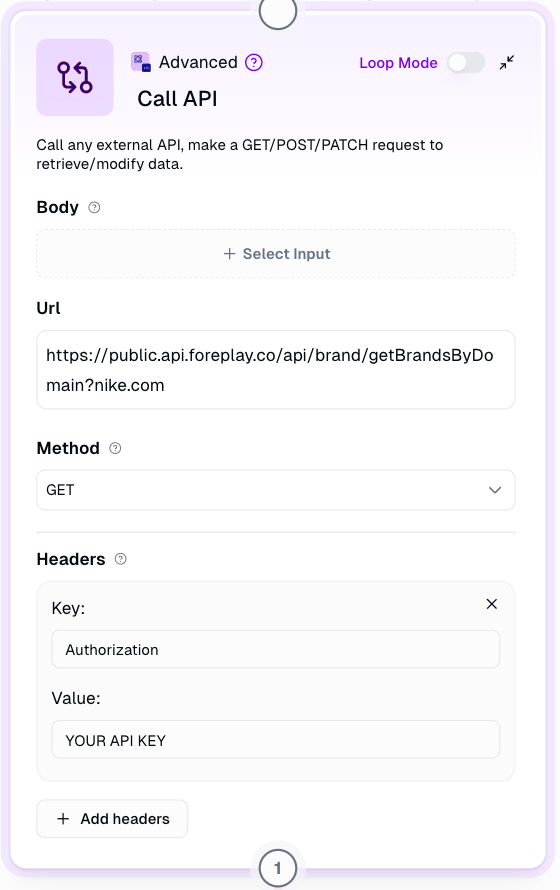
B. How to add a Foreplay API endpoint in Gumloop
Go to the Foreplay API docs: https://public.api.foreplay.co/doc
Copy the endpoint you want to use
Add the endpoint to end of the base URL
For example:
https://public.api.foreplay.co/doc/api/brand/getBrandsByDomain

C. How to add a query parameters in Gumloop
Go to the Foreplay API docs: https://public.api.foreplay.co/doc
Copy the query parameter you want to add
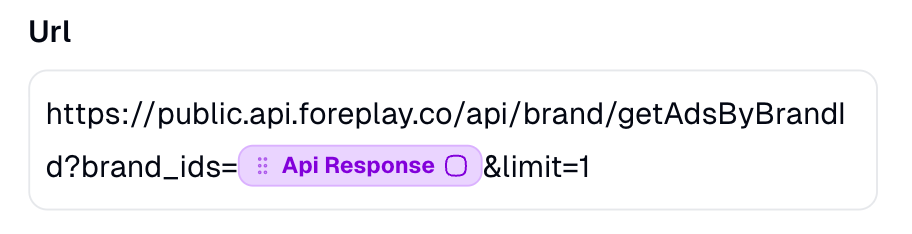
Add the query parameter to the end of your URL
For example:
https://public.api.foreplay.co/doc/api/brand/getBrandsByDomain?brand_ids=12345678
OR drag and drop the dynamic variable from a previous output in your workflow
Was this helpful?
Still need help? Share an idea