Custom Conversions
Custom conversions let you create rules for events, allowing you to measure more specific customer actions and the value they generate. Learn how you can utilize your custom conversions in Lens.
Written By Nathan Raymant
Last updated Over 1 year ago
Learn about creating custom conversions in Meta:
https://www.facebook.com/business/help/780705975381000?id=1205376682832142
Importing Custom Conversion Events
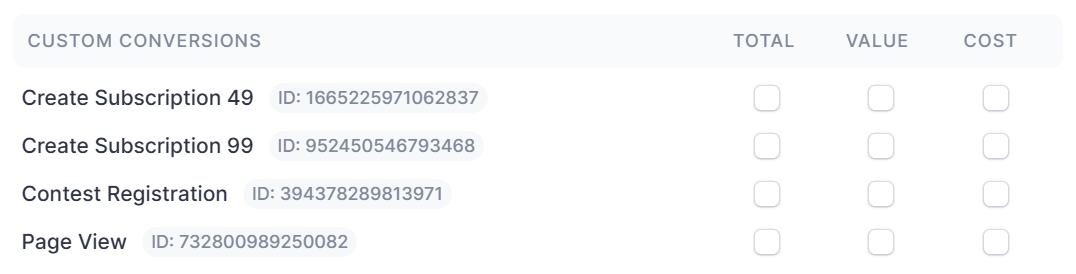
Lens will automatically import custom conversions defined in your Meta Ad account for use in all areas of the product, including ✅ Top Performing Reports , ✅ Comparison Reports , ✅ Filters , etc. When custom conversions are successfully imported, they will appear under the ‘Conversions’ section in the customize columns drawer:
Every time Lens pulls the latest data from your ad accounts, we will check for any new custom conversions. This means there may be a delay (up to 24 hours) between when you create the conversion event and when it gets added to Lens.
Three Selectable Metrics for one Conversion Event
For each custom conversion imported, we generate three metrics for use within Lens:
Total — The total number of times this event occurred.
Value — The total value generated by occurrences of the event (depending on its user-defined value)
Cost — The average cost per conversion event
(total conversions / spend)
Notes
Custom conversions are specific to ad accounts, and therefore specific to the Lenses that use said ad accounts. If you save a custom conversion metric to a column preset, those metrics will not appear when using that preset in other Lenses.
Was this helpful?
Still need help? Share an idea